

What is the difference between an insurance agency whose automation runs flawlessly and one that is constantly troubleshooting the same broken sequences?
It is almost always the workflow underneath it.
Automation executes a process. When the process is defined and consistent, the automation runs it at scale. When the process is a habit that lives in one producer's head, automation accelerates that inconsistency.
At Lava Automation, we have built insurance workflow automation inside more than 300 agencies. The most common reason implementations underdeliver is that the workflow was never ready to begin with.
In this article, you will learn what makes an insurance workflow automation-ready, which workflows to start with, and how to audit what you have before you build anything.
Why Most Insurance Agency Workflows Are Not Ready to Be Automated
A workflow that is not ready to be automated depends on a person's judgment to decide what happens next at every step.
When a lead gets assigned based on gut feel, that is not a workflow. When a renewal reminder goes out only when a producer remembers, that is not a workflow, either. These are habits that produce inconsistent results and fail when someone tries to automate them.
Insurance workflow automation requires a defined process to run. If the process does not exist in a consistent documented form, the automation has nothing to execute.
The worst thing is, most agencies discover this six months into an implementation that is not delivering what it promised.
What Makes an Insurance Workflow Automation-Ready
Every workflow you plan to automate should meet all four before you configure anything.
It has a clear trigger.
Something specific and identifiable causes the workflow to start. This could be a lead form submission or a policy expiration date.
It follows the same steps every time.
The path from trigger to completion should be consistent regardless of who is handling it.
It has a defined endpoint.
The workflow should have a clear finish line.
It has documented exceptions.
Workflows that fall outside the standard path should be documented so the automation knows when to hand off to a producer.
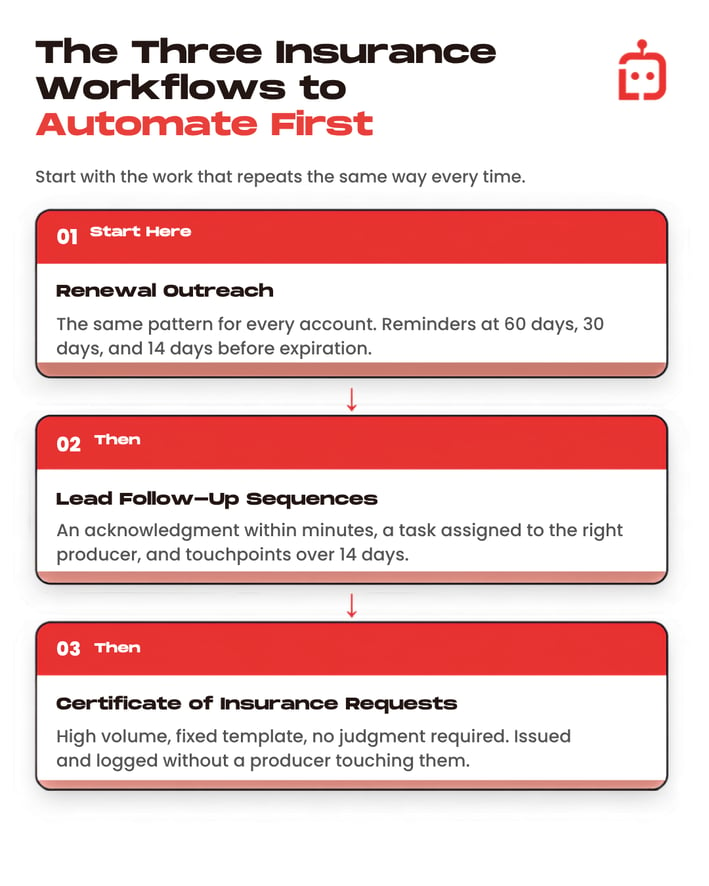
The Three Insurance Workflows Every Agency Should Automate First
Renewal outreach
This follows the same pattern for every account: reminders at 60 days, 30 days, and 14 days before expiration.
Lead follow-up sequences
This needs an acknowledgment within minutes, a task assigned to the right producer, and a sequence of touchpoints over 14 days.
Certificate of insurance requests
This follows the same steps every time: route, process, return. The only variation is the exception. Automating the standard path and building an exception flag removes this workflow from the producer queue entirely.
These three workflows are the right place to start. Before you build them, it is worth understanding which one your agency needs most urgently. Most agencies have one area where the operational drag is costing them the most selling time, and that is where automation should go first.
To identify where insurance workflow automation will deliver the fastest return inside your specific operation, read: Where Insurance Process Automation Makes the Biggest Impact
What an Automation-Ready Workflow Looks Like in Practice
Kali Dewitt's agency came to Lava with a challenge familiar to most growing insurance operations. The workflows existed in practice but not on paper. Each producer handled renewal outreach differently, and the agency had no consistent way to track which clients had been contacted or what stage each account was in.
Before working with Lava, the agency had no documented renewal process and no visibility into pipeline activity across producers. Service and sales tasks were being missed because the process had never been defined clearly enough to execute consistently.
Before building automation-ready workflows:
- Renewal outreach ran on individual producer habits
- The sales pipeline had no documented stages
- Non-pay cancellations and claims had no structured follow-up process
After Lava documented the workflows first:
- A personal and commercial lines renewal process was built with a defined touchpoint at every stage of the client relationship
- The sales pipeline was documented so producers could be tracked against their goals each month
- Service workflows for non-pay cancellations and claims were standardized so nothing moved without a next step assigned
In Kali's words: "We're able to actually document our processes and follow those, which has been a huge pain point for the agency."
What changed was the process. Automation simply made it consistent at scale.
How to Audit Your Current Workflows Before You Automate
Run every workflow you plan to automate through four questions:
- Can you write down every step from trigger to completion in under ten minutes? If not, the workflow is not defined enough to automate.
- Would two different producers follow the exact same steps? If no, standardize the process first.
- What happens when something goes wrong? If you cannot describe the exception and what it triggers, the automation will not know when to stop.
- Has anyone outside the person who created it followed it successfully? If not, document it to the point where a new team member could execute it on day one.
What Happens When You Automate Workflows That Are Actually Ready
You came into this article to understand why automation implementations fail and what separates those that deliver results from those that require constant manual intervention.
The answer is the workflow underneath the automation. When the process is defined, consistent, and documented, automation runs it at scale. When it is a habit that lives in one producer's head, automation accelerates the inconsistency.
Before you build any insurance workflow automation, map the process. Define the trigger, document the steps, identify the exceptions, and test it manually. The agencies that skip this step rebuild their automation six months later.
At Lava Automation, every build starts with a mapping phase before a single workflow is configured. Over $4 billion in premium runs on what we have built across more than 300 agencies.
To make sure you choose a provider who builds the right way from day one, read: What to Ask Before Signing With an Insurance Automation Provider
Frequently Asked Questions
What makes an insurance workflow ready to be automated?
It needs four things: a clear trigger, consistent steps, a defined endpoint, and documented exceptions. Any workflow missing one of these will need manual fixes after automation goes live.
Which insurance workflows should be automated first?
Renewal outreach, lead follow-up sequences, and certificate of insurance requests. All three are high volume, follow a predictable pattern, and currently run through licensed staff by default.
How do you know if your current workflows are ready to automate?
Ask four questions: Can you document every step in under ten minutes? Would two producers follow the same steps? Can you describe what happens when something goes wrong? Has anyone outside the creator followed it successfully?
What does Lava do before building insurance workflow automation?
Every build starts with a mapping phase. Existing workflows are documented, triggers and exceptions are defined, and the process is validated before any automation is configured.
