

Your server crashes on a Tuesday morning. Fourteen employees cannot access client files. Your CRM is unreachable. Three hours have passed, and the contractor you called is still diagnosing the problem.
This is the situation most growing businesses face at least once before they decide to stop managing IT reactively. The question is how much it costs before that decision gets made.
At Lava Automation, we have deployed managed IT services inside growing businesses across industries, handling sensitive client data. The most resistant are almost always the ones paying for reactive fixes, lost productivity, and security exposure without ever seeing those costs on a single line item.
In this article, you will learn what unmanaged IT actually costs a growing business, how to calculate the real return on managed IT services, and what that return looks like in practice.
What Unmanaged IT Actually Costs a Growing Business
The cost of unmanaged IT shows up in hours lost to troubleshooting, productivity gaps, and security vulnerabilities nobody is actively monitoring.
Here is what that looks like across a typical 20-person business:
- Downtime — The average cost of unplanned IT downtime for a small business runs between $8,000 and $15,000 per hour. A single server failure that takes four hours to resolve costs more than most businesses spend on managed IT services in a quarter.
- Reactive support — Paying for IT support only when something breaks means paying premium rates for emergency fixes at $150 to $200 per hour.
- Security breaches — The average cost of a small business data breach exceeds $100,000 when remediation and regulatory exposure are factored in.
- Staff productivity — Even one lost hour per employee per week adds up to more than 1,000 hours of lost productivity annually across a 20-person team.
The cost is real. It is just distributed across enough line items that most businesses never see the total.
What Managed IT Services Cover That Internal IT Cannot
Most businesses either have no dedicated IT support or a single internal person managing everything reactively.
Managed IT services cover the gaps both approaches leave open.
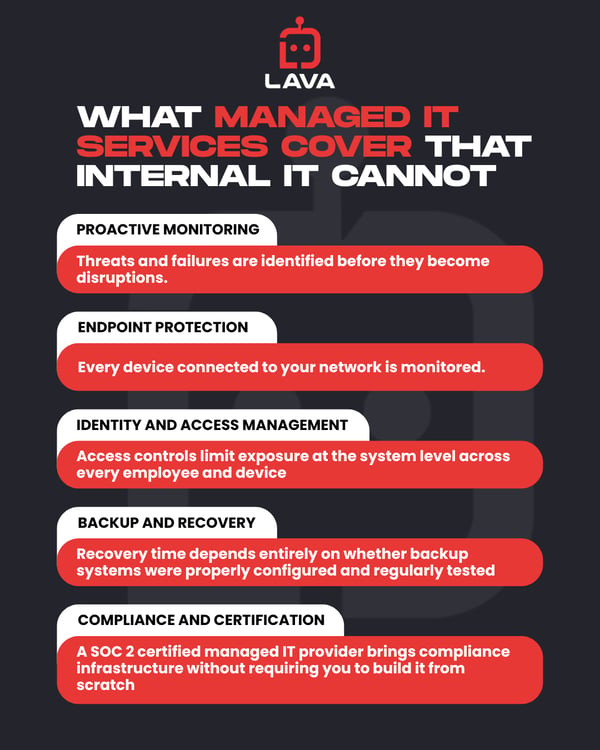
- Proactive monitoring — Threats and failures are identified before they become disruptions
- Endpoint protection — Every device connected to your network is monitored
- Identity and access management — Access controls limit exposure at the system level across every employee and device
- Backup and recovery — Recovery time depends entirely on whether backup systems were properly configured and regularly tested
- Compliance and certification — A SOC 2 certified managed IT provider brings compliance infrastructure without requiring you to build it from scratch
What Your IT Environment Looks Like Right Now
You have 22 employees. Fourteen users use the same passwords across multiple platforms because your business has never implemented a password management system.
Five remote employees connect to client files from personal laptops that have never been assessed for security compliance. Your last backup test was either months ago, or it has never happened.
Nobody has flagged any of this as a critical problem because nothing catastrophic has occurred yet. That creates a set of unaddressed vulnerabilities waiting for a trigger.
How to Calculate the ROI of Managed IT Services
The return on managed IT services comes from two directions: cost reduction and risk elimination. Here is what that math looks like for a typical 20-person business:
|
Cost Category |
Annual Estimate |
|
Reactive IT support at $175 per hour |
$18,000 |
|
Downtime from system disruptions |
$22,000 |
|
Lost staff productivity |
$14,000 |
|
Security incident exposure |
Variable |
|
Total unmanaged IT cost |
$54,000+ |
|
Managed IT services at $150 per seat |
$36,000 |
ROI = (Savings − Investment) ÷ Investment
($54,000 − $36,000) ÷ $36,000 = 50% return in year one before any security incident is factored in.
The calculation changes significantly when an incident occurs. A single successful phishing attack that requires outside legal counsel and system remediation can push the true cost of unmanaged IT well past $100,000 in a single year.
The ROI of managed IT services is strongest for businesses that calculate both what they are currently spending on reactive IT and what a single significant incident would cost them.
To understand why reactive IT support creates compounding risk for growing businesses, read: Why Reactive IT Support Is Not Enough for a Growing Business
*Estimates are based on industry averages and vary by business size and incident severity
What the ROI of Managed IT Services Looks Like in Practice
Take, for example, a 15-person insurance agency that was managing IT reactively at $175 per hour for emergency support.
Before managed IT services:
- Three significant system disruptions in one year, consuming an estimated 40 staff hours
- A successful phishing attempt exposed client contact information, requiring outside legal counsel
- The total estimated IT-related cost for the year exceeded $28,000
After implementing managed IT services at $150 per seat per month:
- The monthly cost for 15 seats was $2,250 or $27,000 annually
- Proactive monitoring caught two potential security incidents
- Zero successful phishing attempts in the following 12 months
- Staff recovered an estimated 30 hours annually previously lost to IT troubleshooting
The annual cost was lower, and the coverage was significantly higher.
What the ROI of Managed IT Services Means for Your Business
You came into this article trying to understand whether managed IT services deliver a return worth the investment. Before reading this, you were likely measuring that investment against your current reactive support spend. That comparison underestimates both what you are spending and what you stand to lose.
The businesses that delay the managed IT decision are only deferring the cost of an incident that becomes more expensive the longer the vulnerabilities remain unaddressed.
The real return comes from downtime that never happens, breaches that never materialize, and compliance exposure that never becomes a liability.
When managed IT services own your technology infrastructure, your team stops absorbing IT problems and starts focusing on the work that grows the business.
At Lava Automation, our managed IT service covers endpoint protection, identity and access controls, backup and recovery, phishing defense, and 24x5 user support under one SOC 2 certified partnership. We partner with businesses that trust us with their most sensitive client data.
To understand exactly what managed IT covers and how it compares to building an internal team, read: In-House IT vs Managed IT Services: A Realistic Comparison
Frequently Asked Questions
What is the ROI of hiring a managed IT provider?
The return comes from reduced downtime costs, eliminated reactive support fees, lower security breach risk, and recovered staff productivity.
How much do managed IT services cost?
Managed IT services from a provider like Lava run approximately $150 per seat per month with endpoint protection, email security, backup and recovery, access controls, and 24x5 user support included.
What do managed IT services cover that internal IT cannot?
Managed IT services provide around-the-clock monitoring, proactive threat detection, compliance infrastructure, and specialized expertise that most internal IT resources cannot cover at the same depth or scale.
When does it make sense to invest in managed IT services?
When the cost and risk of reactive IT support exceed the cost of proactive managed coverage, for most businesses, that threshold arrives around the time they start handling sensitive client data at volume.
