

Does your team share login credentials to keep things moving? Do employees access client systems from their personal laptops or phones because it is easier than setting up a separate device?
These habits develop gradually, out of convenience, and go unquestioned until something forces the conversation. By then, the exposure had already been building for months.
At Lava Automation, we manage IT and security infrastructure for growing businesses across insurance agencies, financial services firms, and service-based operations. The vulnerabilities we find most consistently are shared credentials sitting in a spreadsheet and a personal laptop with no endpoint monitoring connecting to a client portal.
We see these patterns repeatedly in businesses that have grown past ten employees and never formalized how access gets assigned or reviewed.
In this article, you will learn why shared passwords and unmanaged personal devices create serious exposure, how attackers exploit these habits, and what structured access control actually looks like.
Why Sharing Passwords at Work Is a Security Risk
Shared passwords feel harmless when your team is small, and trust is high.
One login for the agency management system. A shared inbox password is passed around in a group chat. A single admin credential is used by everyone who needs access.
The problem here is that shared credentials make it nearly impossible to know who did what, when, and from where.
When every team member logs in under the same account:
- If a record is changed incorrectly, you cannot trace who changed it
- If a credential is compromised, you cannot determine which device or session was responsible
- If someone leaves the company, that credential stays active and accessible to anyone who still has it saved somewhere
When a credential is shared, accountability disappears, and accountability is what makes access controllable.
Attackers know this. Credential stuffing attacks, in which compromised username and password combinations are automatically tested across hundreds of systems, succeed most often against businesses that have used shared credentials for years.
A breach of a single system can grant access to everything connected to that same login.
The Security Risk of Personal Devices in the Workplace
When an employee accesses your agency management system or your client files from their personal phone or laptop, that device becomes part of your security environment, whether you intended it to or not.
You have no visibility into that device. You do not know whether it is running current software or if it has already been compromised by malware picked up on a personal network. You cannot remotely wipe it if the employee leaves or if the device is lost.
Consider a scenario that plays out more often than most business owners realize.
An employee uses their personal laptop to log into your client portal from a coffee shop. The device has not been updated in three months. A keylogger installed through a browser extension captures the credentials. The attacker now has access to your client data, and you have no alert and no way to detect it until a client reports something wrong.
Personal devices are not secured to your standards because they were never part of your security environment to begin with.
How Poor Password and Device Habits Grow Into Bigger Problems
When a business has five employees, shared credentials and personal devices are manageable risks. The team is small, oversight is close, and the damage from a single compromised account is contained.
As the business grows, both risks multiply.
More employees mean more shared credentials circulating across more devices and communication channels. More personal devices mean more unmonitored endpoints accessing your systems every day.
The informal habits that felt low-risk at five employees become serious exposure at twenty-five.
Most businesses do not recognize the shift until something forces the conversation.
By that point, credentials need to be audited and reset across every system, and devices need to be replaced. That process almost always surfaces additional vulnerabilities that had accumulated quietly while the informal practices were in place.
What Structured Access Control Looks Like
Fixing shared passwords and personal device risk does not require an enterprise IT department. It requires defined practices applied consistently.
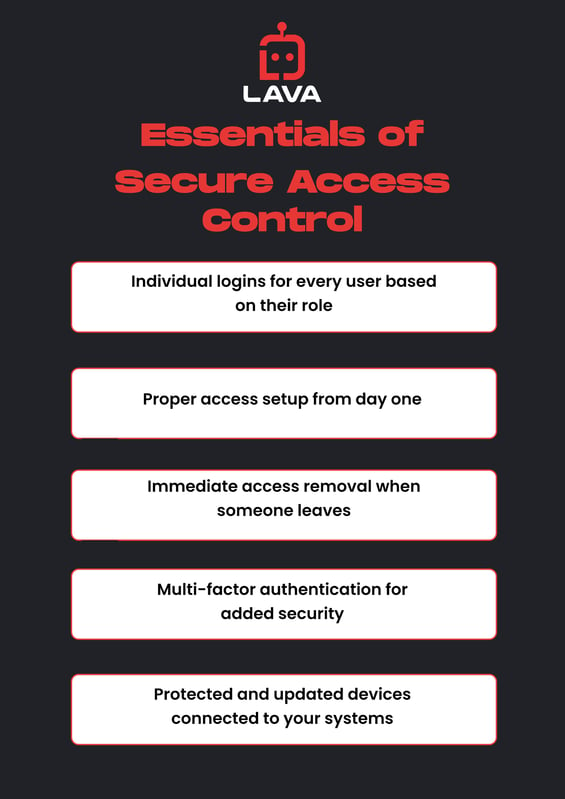
- Every user should have their own credentials tied to their role
- When someone joins the team, access is provisioned correctly from day one
- When someone leaves, access is removed immediately
- Multi-factor authentication ensures that a stolen password alone is not enough to gain access
- Devices that connect to your systems should have endpoint protection active and updates enforced
Many businesses have an idea of what good security looks like, but the real issue is that nobody owns the process end-to-end.
Structure requires someone to build it, maintain it, and review it as the team changes.
To understand what proactive IT management looks like inside a growing business, read: What Does a Managed IT Provider Do for My Business?
When to Fix Your Business Password and Device Security
Shared passwords and personal devices are active vulnerabilities, and they become more expensive to solve every month they remain unaddressed.
Most growing businesses already sense the exposure. Access was never formally assigned. Devices connect without oversight. Nobody knows exactly who still has credentials from two years ago.
Every month these habits go unaddressed, the cost of fixing them increases, and the window for a breach stays open.
If that accountability does not exist inside your business today, it means you have outgrown the informal approach, and the structure needs to catch up.
At Lava Automation, we manage your full IT and security infrastructure for $150 per seat per month. Endpoint protection, identity and access management, dark web monitoring, email security, Security Operations Center monitoring, and 24x5 user support. One partner. One flat rate.
Book a demo with Lava Automation to walk through your current access environment and identify exactly where shared credentials and unmanaged devices are leaving your business exposed.
Frequently Asked Questions
Why are shared passwords a security risk?
Shared credentials remove accountability from your access logs. You cannot trace who made a change, detect which session was compromised, or ensure access is removed when an employee leaves.
Are personal devices safe for accessing business systems?
Personal devices operating outside your security environment are unmonitored and not subject to your security policies. If a personal device is compromised, you have no visibility and no way to respond until the damage is already done.
What is the first step to fixing shared password problems?
Audit which systems currently use shared credentials and replace them with individual accounts tied to specific roles. Enable multi-factor authentication on every system that supports it. Then implement a process for provisioning and removing access as your team changes.
How does a managed IT provider handle access control?
A managed IT provider defines role-based permissions, enforces credential policies, manages device enrollment, and maintains access controls as the team evolves.
