

A slow login here. A dropped connection there. A file that will not open until someone restarts their laptop for the third time that week. Add it up across a team, across a month, and the number becomes impossible to ignore.
Many business owners never calculate what IT problems are costing them in time, because the losses never show up as one dramatic event. They show up as ten minutes here, fifteen minutes there, spread across every employee, every day, until the total quietly becomes one of the highest hidden costs in the business.
At Lava Automation, we provide IT support for insurance companies and other growing businesses. The pattern holds regardless of company size, because the five most common IT issues repeat in nearly identical ways across every business we work with.
In this article, you will learn why small IT problems go unnoticed until they add up, the five most common issues eating into your workday, what unmanaged IT is actually costing you right now, and what to do about it.
Why Small IT Problems Go Unnoticed Until They Add Up
A single slow login does not feel worth complaining about. Neither does a printer that needs restarting, or a file that takes an extra minute to sync. Each moment is small enough to shrug off.
The problem is that these moments happen constantly, across every employee, every single day. Here is what that actually adds up to:
- 5 minutes per delay
- × 20 employees
- × 3 incidents per day
- = 300 minutes lost daily, or 5 hours a day
- × roughly 20 workdays per month
- = approximately 100 employee hours lost every month
That is just an illustrative benchmark. Your actual number depends on your team size and how often these interruptions occur. But it illustrates exactly how a handful of small, forgettable delays compound into a number large enough to represent a real cost to your business.
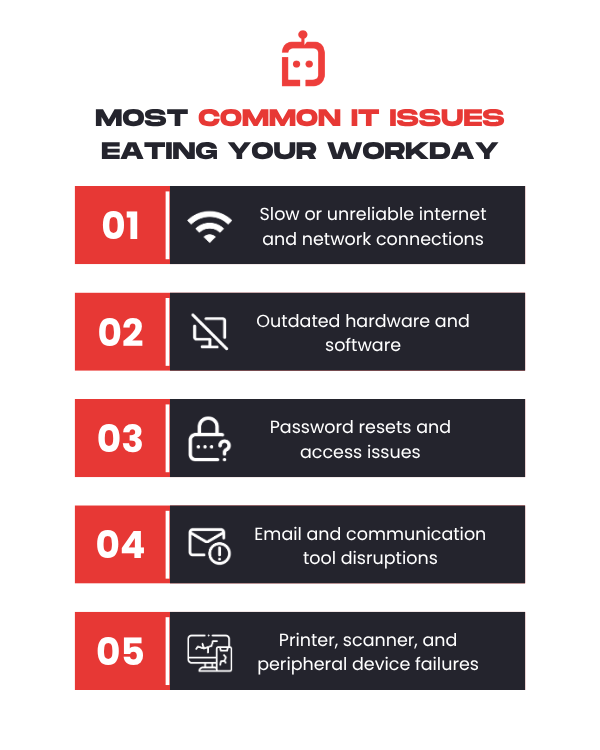
The Five Most Common IT Issues That Eat Into Your Workday
Certain categories of IT problems show up across nearly every business we work with, regardless of industry or size.
- Slow or unreliable internet and network connections, causing delays in loading applications, syncing files, or joining calls
- Outdated hardware and software, requiring longer load times, more frequent crashes, and workarounds employees have learned to tolerate
- Password resets and access issues, especially when employees are locked out of systems they need immediately.
- Email and communication tool disruptions, including delayed messages, sync issues, and login problems across devices
- Printer, scanner, and peripheral device failures, which seem minor individually but recur constantly across a busy office
Each of these categories alone might seem manageable. Combined, they represent the majority of the time loss most businesses never formally track.
To understand why waiting until something breaks is the most expensive way to handle IT, read: Why Reactive IT Support Is Not Enough for a Growing Business
What Unmanaged IT Is Actually Costing You Right Now
Unmanaged IT means no one is actively monitoring your systems or catching small issues before they interrupt someone's workday. It usually means reactive support: nobody addresses a problem until an employee notices it and reports it, often after it has already cost them time.
Think about your own team right now. Someone is probably waiting for a page to load. Someone else restarted their computer because it froze mid-task. A third person spent ten minutes on the phone with a vendor trying to reset a password nobody could locate.
None of that shows up on a report or gets logged as a cost anywhere in your business. It simply happens, repeatedly, and gets absorbed into what everyone assumes is a normal workday.
If you multiplied every small IT delay your team experienced today by every employee, by every workday, the number would likely be far higher than anyone in your business has ever estimated.
Three Steps to Take Before IT Problems Cost You More
Getting a handle on IT time loss starts with three specific steps.
Track the frequency
Many owners only notice IT problems when something breaks completely. The smaller, recurring issues rarely get logged, even though they are the ones adding up the fastest.
Identify which issues repeat most often across your team.
A single employee's slow computer is a minor annoyance. The same issue across ten employees is a systemic problem worth solving.
Get a professional assessment of your current IT environment.
Most businesses cannot accurately estimate their own time loss without an outside perspective, since the issues have become normalized internally.
Once you know where the time is actually going, fixing it comes down to one shift: moving from reactive IT to proactive IT.
Reactive IT means problems only get addressed after someone notices and reports them. Proactive IT means the systems themselves are being watched continuously.
Devices are monitored for early warning signs, and software gets updated on a schedule instead of after something breaks. The interruption gets caught and fixed before it reaches your team at all.
At Lava Automation, that shift is exactly what our managed IT services deliver. Endpoint monitoring, scheduled maintenance, and 24x5 support work in the background so small issues get resolved before they compound into hours of lost time.
What Happens When IT Stops Costing You Time
You came into this article wondering whether IT issues were actually costing your business meaningful time, or whether it just felt that way on a bad day.
The honest answer is that the time loss is almost always larger than it feels, because it never arrives as one visible event. It arrives in fragments spread across every employee, every day, quietly consuming hours that never get counted anywhere.
At Lava Automation, we provide IT support for insurance companies and other growing businesses under a SOC 2 Type 1 certified infrastructure, with 24x5 user support built specifically to catch these fragments before they compound.
Once you know roughly how much time IT issues are costing you, the next question is what a professional solution would actually cost, and whether the return makes sense for your business. To understand that fully, read: What Is the ROI of Hiring a Managed IT Provider?
Frequently Asked Questions
How much time do businesses actually lose to IT issues each month?
While the exact number varies by business size, small recurring issues like slow logins, connectivity problems, and password resets can add up to several hours per employee monthly.
Why do IT problems go unnoticed for so long?
IT time loss shows up in small fragments spread across every employee and every day, which makes it easy to normalize and difficult to quantify without deliberate tracking.
What are the most common IT issues costing businesses time?
Slow or unreliable internet connections, outdated hardware and software, password resets, email and communication tool disruptions, and peripheral device failures are the most frequently reported issues across growing businesses.
How can a business calculate its actual IT time loss?
Start by tracking the frequency of IT issues rather than just their severity, identify which problems repeat most often, and consider a professional assessment.
